

轻量化个人主页
本文作者为打造个性化个人主页,开发了开源项目 minimal-homepage,核心特色是轻量化设计、高度集成配置 —— 无需修改多个文件,仅通过 main.config.js 即可完成所有设置,还支持显色模式切换、Github 信息对接、RSS 源自定义等实用功能,适配个人主页的简洁需求。项目部署极为便捷,提供 npm 和 git 两种简单安装方式,复制粘贴命令即可完成操作,后续可轻松部署至 Github Pages、Vercel 等平台,步骤简单易懂。这是作者首个正式开源项目,解决了市面模板臃肿、配置繁琐的痛点,欢迎用户使用并提出建议。
写在开头
做这个个人主页项目的目的,起因是因为我一直想拥有一个自己的个人主页,但是没有找到合适的模板
市面上的模板不是过于臃肿,就是配置过于繁杂,反而不像一个个性化的个人主页,更像是一个小型博客
于是便有了这个项目minimal-homepage
项目介绍
预览
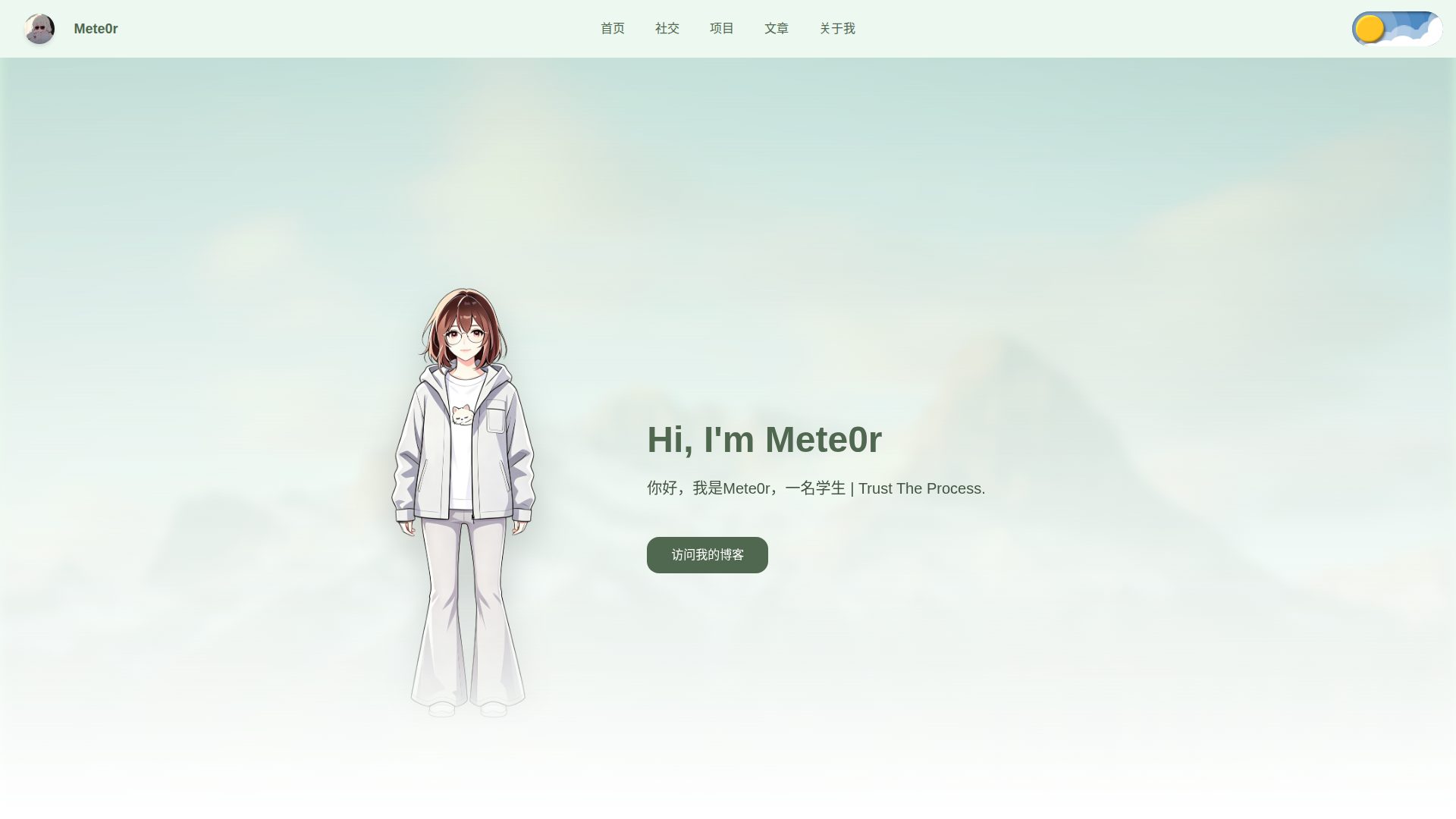
首先奉上我自己的个人主页,因为是纯原版功能,没有改动,所以也就等同于预览站点
预览图:
特点
- 1 .轻量化
- 2 .可根据需求进行统一配置
- 3 .支持多种显色模式,配置内一键切换大师配色
- 4 .支持对接博客RSS源,并支持自定义RSS源
- 5 .支持使用GithubAPI获取Github信息,并显示在页面上
- 6 .支持使用GithubAPI获取Github信息的方式下配置项目封面
- 7 .支持展示个人虚拟形象
快速开始
其实关于部署,我本是想像Hexo这种应用一样,直接npm后就可以释放到目录,不过不知道是否是配置原因,目前使用npm只会生成在node_modules目录下,所以我也配备了Windows下可以一键复制的命令
相应的,如果您喜欢直接阅读Github的README,那么请移步mete0rxsc/minimal-homepage#1-安装
视频部署教程
使用 npm 安装
- 安装
npm install minimal-homepage- 复制项目至当前目录
xcopy /E /I /H node_modules\minimal-homepage .选择覆盖package.json文件
- 进入项目
cd minimal-homepage- 安装依赖
npm install使用 git 安装
- 克隆仓库
git clone https://github.com/mete0rxsc/minimal-homepage.git- 进入项目
cd minimal-homepage- 安装依赖
npm install2) 本地开发
npm run dev3) 生产构建
npm run build4) 本地预览构建产物
npm run preview安装步骤极其简单,直接复制粘贴命令即可,这边推荐首选npm安装方式
项目结构

项目配置
安装好后,进入到项目目录,您并不需要修改其他任何的文件,所有配置只需要修改main.config.js文件即可
这也是我写的项目最大的特色,配置非常简单,只需要修改一个文件,就可以修改所有配置项
我的个人习惯造就了这个项目的高度配置集成性,我不喜欢跑到各个目录下修改一个个的配置文件,有时还有重复的配置
配置项如下:
以下配置含有我的配置信息,请自行修改,此文件内的所有配置均可随意修改
main.config.js
export default {
  site: {
    title: 'Mete0r 的个人主页', //网站标题
    icon: 'https://img.xscnet.cn//i/2026/04/11/69da42c41efd5.png', //网站图标
    background: 'https://img.xscnet.cn//i/2026/04/11/69da185da44e4.png', //网站背景
    useSpecialLightPalette: true, // 是否启用白天特殊配色
    useSpecialDarkPalette: false // 是否启用黑夜特殊配色
  },
  author: {
    name: 'Mete0r', //你的名称
    avatar: 'https://img.xscnet.cn//i/2026/04/11/69da166816afc.jpg', //你的头像
    intro: '你好,我是Mete0r,一名学生 | Trust The Process.', //你的简介
    aiPortrait: 'https://img.xscnet.cn//i/2026/04/11/69da42c41efd5.png', //你的画像
    mbti: 'INTP', //你的MBTI人格类型(影响到关于我页面)
    aboutMeintro: '一名高中生,⌈ 给时光以生命,给岁月以文明 ⌋  |  小王子说:你要对你种下的玫瑰花负责。 保护她的刺,保护她的花瓣。 是你在那朵玫瑰花上耗费的时间和经历,才使得他变得如此重要。 「因为被这朵玫瑰花驯养,所以我们彼此互相需要 。」' //关于我的介绍
  },
  navLinks: [ //导航栏
    { name: '首页', url: '/' },
    { name: '社交', url: '#socials' },
    { name: '项目', url: '#projects' },
    { name: '文章', url: '#articles' },
    { name: '关于我', url: '/about' }
  ],
  blog: { //跳转博客相关配置
    url: 'https://www.xscnet.cn',
    rssFeed: 'https://www.xscnet.cn/atom.xml',
    randomCoverApi: 'https://rand.xscnet.cn/mix' //随机封面API(可选,文章列表会使用这个接口获取随机封面图)
  },
  github: {
    useGithubApi: true, // 是否使用 GitHub API 获取项目(如果为 false,则只显示 manualRepos 中的项目)
    username: 'mete0rxsc', // GitHub 用户名
    maxRepos: 4, // 最大显示仓库数量
    excludeForks: true,  // 是否排除 Fork 的仓库

    // API 模式下:按仓库名称匹配封面
    covers: {
      // 'repo-name': 'https://example.com/repo-cover.jpg'
      'minimal-homepage': 'https://img.xscnet.cn//i/2026/04/12/69db326f931e2.webp',
      'Minecraft-Tree-Hole': 'https://img.xscnet.cn//i/2026/04/12/69db32f13bd07.webp',
      'Mete0r-Tree-Hole': 'https://img.xscnet.cn//i/2026/04/12/69db348b726e1.webp',
      'valaxy-yun-external-link': 'https://img.xscnet.cn//i/2026/04/12/69db34f47cc87.webp',
    },

    // 非 API 模式下:手动维护项目(不会显示 Star)
    manualRepos: [
      // {
      //   name: 'My Awesome Project',
      //   url: 'https://github.com/your-name/your-repo',
      //   description: '项目简介',
      //   language: 'JavaScript',
      //   visibility: 'public',
      //   cover: 'https://example.com/cover.jpg'
      // }
    ]
  },
  socials: [ //社交链接
    { name: 'GitHub', label: 'Open Source', icon: 'https://res.xscnet.cn/BlogStatic/Icon/svg/github-line.svg', url: 'https://github.com/mete0rxsc/' },
    { name: 'X', label: 'Daily Life', icon: 'https://res.xscnet.cn/BlogStatic/Icon/svg/twitter-x-line.svg', url: 'https://x.com/Cqmoyuan/' },
    { name: 'Bilibili', label: 'Videos', icon: 'https://res.xscnet.cn/BlogStatic/Icon/svg/bilibili-line.svg', url: 'https://space.bilibili.com/482787121' },
    { name: '163Music', label: 'Music', icon: 'https://res.xscnet.cn/BlogStatic/Icon/svg/MdiMusicClefTreble.svg', url: 'https://music.163.com/#/artist?id=95704903' },
    { name: 'Email', label: 'Contact Me', icon: 'https://res.xscnet.cn/BlogStatic/Icon/svg/mail-line.svg', url: 'mailto:Mete0r_xsc@hotmail.com' },
    { name: 'Youtube', label: 'Community', icon: 'https://res.xscnet.cn/BlogStatic/Icon/svg/LineMdYoutubeFilled.svg', url: 'https://www.youtube.com/@Mete0r7023' }
  ],
  footer: {
    icp: '吉ICP备2025026551号-2', //ICP备案号
    copyright: '© 2026 Mete0r. All rights reserved.', //版权信息
    email: 'Mete0r_xsc@hotmail.com', //联系邮箱
    links: [ //页脚右下角链接,可不写icon
      {
        name: 'Email',
        icon: 'https://res.xscnet.cn/BlogStatic/Icon/svg/mail-line.svg',
        url: 'mailto:Mete0r_xsc@hotmail.com'
      },
      {
        name: 'GitHub',
        icon: 'https://res.xscnet.cn/BlogStatic/Icon/svg/github-line.svg',
        url: 'https://github.com/mete0rxsc/minimal-homepage'
      }
    ]
  }
}
是的,这个项目非常简单,配置项也很少,但是相信我,个人主页的搭建会十分简单
如果您发现有任何的 bug 或者 建议,请提issue
运行项目
部署完成并改完配置文件后,您可以运行
npm run dev开打开本地预览
构建项目
当您在本地查看完成没有问题的时候,您可以运行
npm run build运行完成后,进入dist目录下,将文件上传至您的服务器即可
或者部署到Github或者Vercel
部署到Github Pages或者Vercel 静态网站托管
进入dist目录下,运行GitBash命令
git init
git add .
git commit -m "deploy"
git branch -M main
git remote add origin <your-github-repo-url>
git push -f <your-github-repo-url> main:gh-pages运行完成后,进入https://<your-github-username>.github.io/<your-repo-name>查看项目
部署到Vercel
部署到Vercel需要先行部署到Github 仓库,然后进入Vercel官网,点击Import Project,选择Github仓库,选择项目,点击Deploy
运行完成后,进入Vercel给的网址即可查看项目
不过Vercel的免费域名有SNI阻断,建议自行准备域名CNAME至Vercel的网址
写在结尾
我喜欢的是,博客功能完整,但是主页类的项目需要尽可能少的功能,让人一样即可看出主要的内容,而不是眼花缭乱的页面
这也是我的个人习惯问题,不过我认为这不是个坏习惯
这是我第一个正式的开源项目,欢迎您的使用,如果喜欢,不妨给个Star~
评论区加载中...