

三月小记:春雨、体检与博客二三事
等一场姗姗来迟的东北春日,记一次十八岁的体检,再为博客添一处安放琐碎的角落——三月,在平凡里悄悄生长。
前言
许久不见朋友们
不知不觉有有近一个月没发过文章了
不过前一阵子就规划了这次的计划,在春天到来之际总结一下平凡的三月~
Next Station is Spring!
报告长官:是春天!
春天到了,万物复苏,看着各位博友争相发出了春日游记,各位博友家乡的花朵都已经含苞待放,心里不由得生出了一丝羡慕
东北的春天一向来的很晚,不知为何?
究竟是心里在作祟,还是天公不作美?
—今年的春天到来的格外慢,慢到好使让人已经习惯这褪去缓慢的冷意
不过,日日夜夜的翘首以盼终究等到了春天的到来,可能是由于学习压力的增大,对于户外的风景有着不同往日的向往
两天前(2026-03-22),我发了一篇说说,是关于我们这里春天第一场雨,可是那时候的空气并不讨人喜爱,反而充斥着一种烟尘味,那是农民春耕焚烧土地上剩余的秸秆的味道
作为一个东北孩子,我总觉得这风和雨,好像是东乡的专属,在别的城市,鲜少能闻到如此”厚重”的桔梗烟味
个人习惯:我个人是一个不抽烟的人,也不喜欢闻到很大的烟味
东北的春天,来了
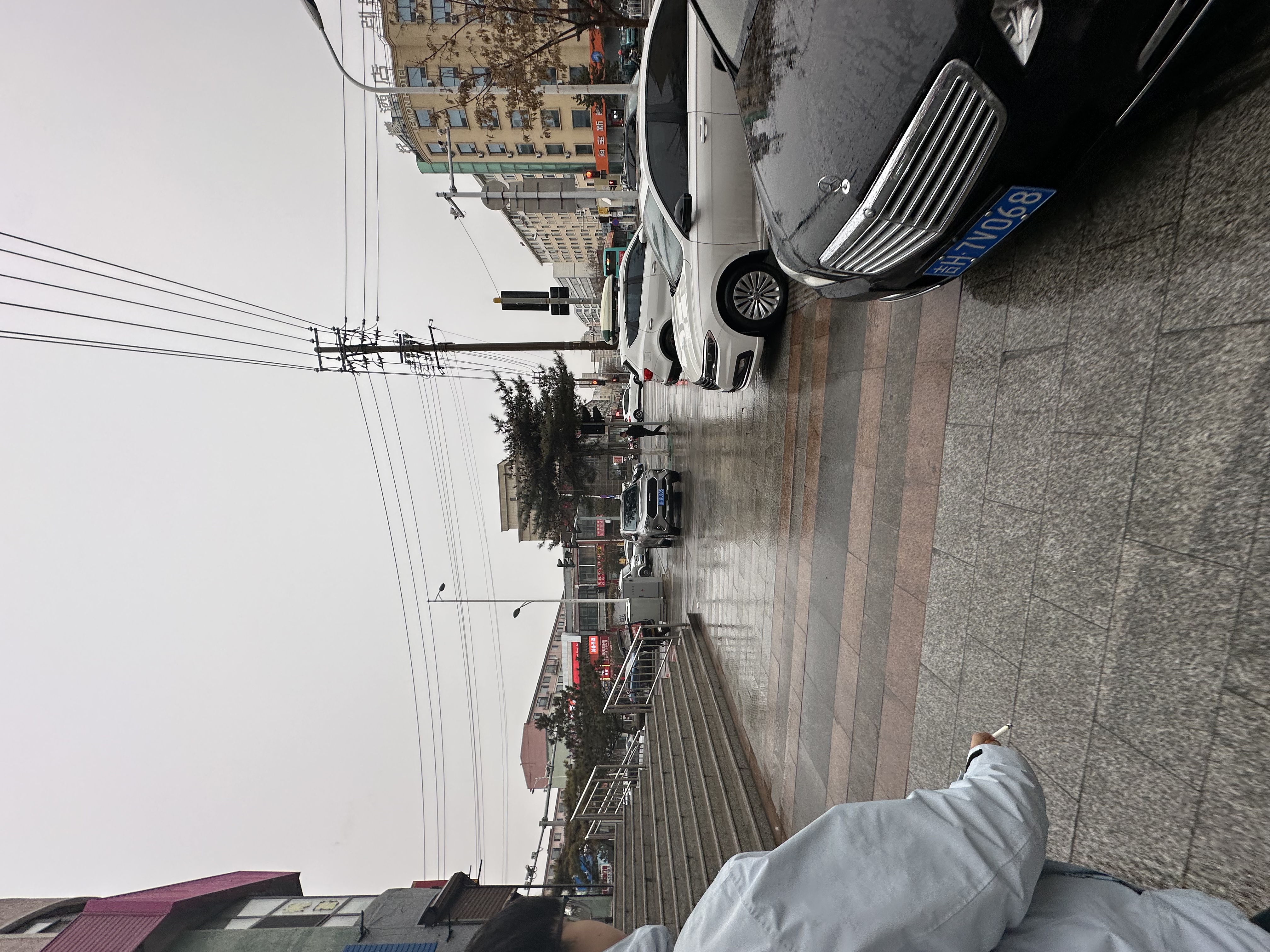 LIVE
LIVE下图:抖音上刷到的一张照片
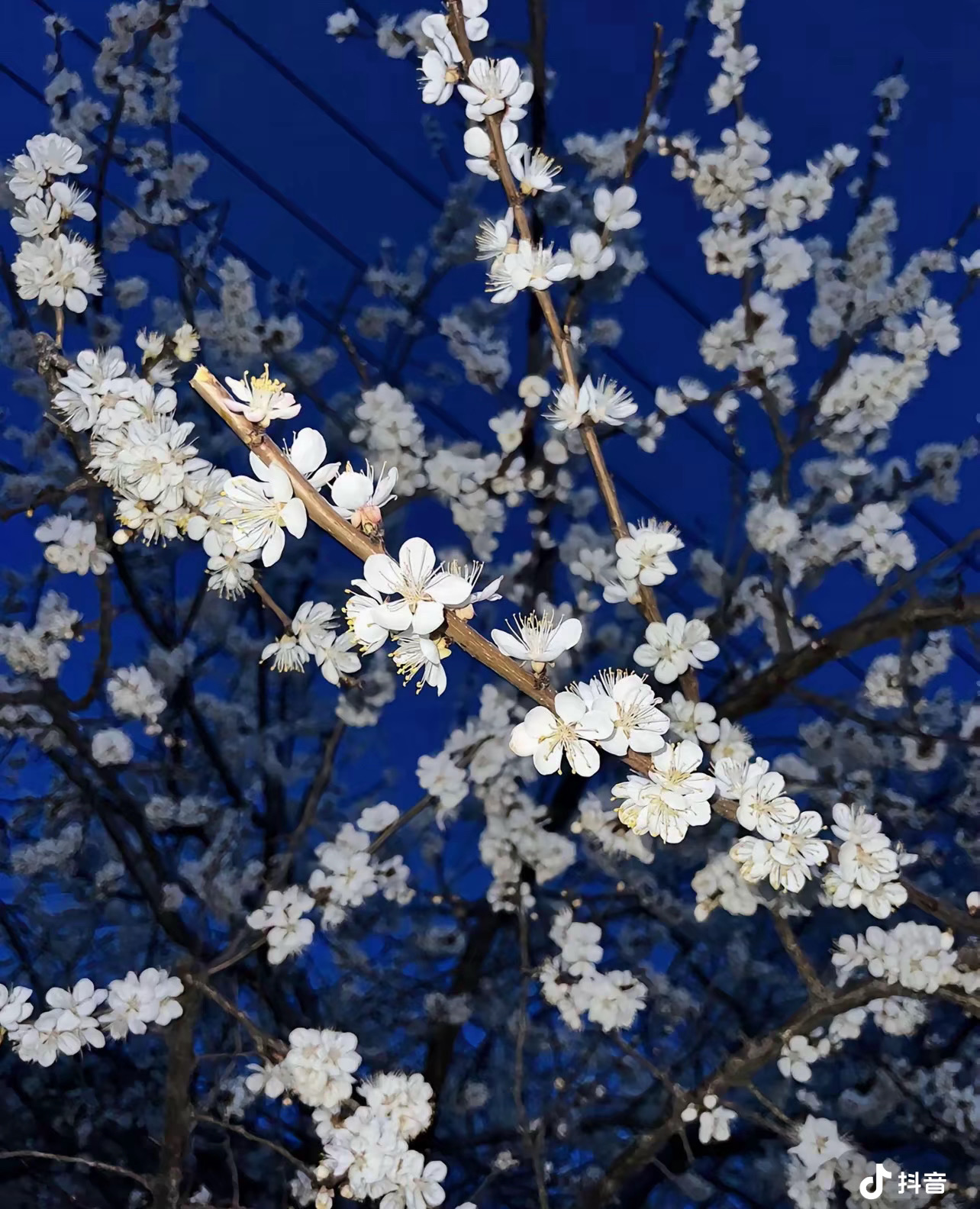 LIVE
LIVE下雨天
我喜欢下雨天,不论是绵绵细雨,还是倾盆大雨,都深得我喜爱
我喜欢雨后的空气,那是一种说不上的清新感,给我带来一种心旷神怡的感觉
雨下的时候,我总觉得,这风和雨,好似大自然的馈赠,冲刷去我一切的烦恼
雨下之后,我总觉得,这风和雨,好似洗涤了一边污浊的空气,让我可以畅快的呼吸
如果有什么人喜欢极端天气,那大概率是和我一样的存在吧。
记一次体检
刚满18岁,心想着去体检一下吧,我还没有全面的了解我我的这副身躯,一不做二不休,就约了一次全面体检
还好,身体不算太差 就是动脉粥样硬化指数,高密度脂蛋白胆固醇,血清尿酸含量的指数不正常
因为我的母亲动脉就不好,所以肯定会有遗传,这个我早有预料,只不过有些超乎预料罢了
罢了罢了,没什么问题,其他地方都还不错
小改动
博客说说页面
这段时间总是在权衡学习和休息的平衡,所以多出了很多闲暇之余,在这些时候,大部分时间我会拿来看看小说缓解一下压力,但还是有不少时间是折腾起了博客
说说页面 是最近新开的一个页面,总不可能有点事情就要发个文章,便想着用说说来代替,我个人是不喜欢发朋友圈的,因为没有什么共同话题,发起来可能很尴尬
首先说说页面需要由衷的感谢 LiuShen大佬的教程 - 从Moments迁移到Ech0 但是由于博客渲染机制的问题,柳哥提供的js并不能在我的博客上正常渲染出说说页面,所以一不做二不休,先部署了一个 Ech0说说系统 ,然后按照柳哥的教程,将他开源的js文件复制到我的博客中,并修改了部分渲染代码,使得Ech0可以在我的博客中正常渲染
测试了一下,Ech0的效果还是不错,功能也很全面了,并且整体较为轻量化的设计,适合于我目前的系统
根据柳哥的js,我又添加了许多的功能,例如LivePhoto的展示,不过最开始的设想是对接苹果的JSAPI,但是由于自身技术不过关,总是会出问题,所以还是利用最简单的视频URL+图片URL的方式实现了
另外感谢 klcdm 的提醒,说说页面的js渲染没有markdown渲染的代码,他为我提供了导入markdown渲染库的代码
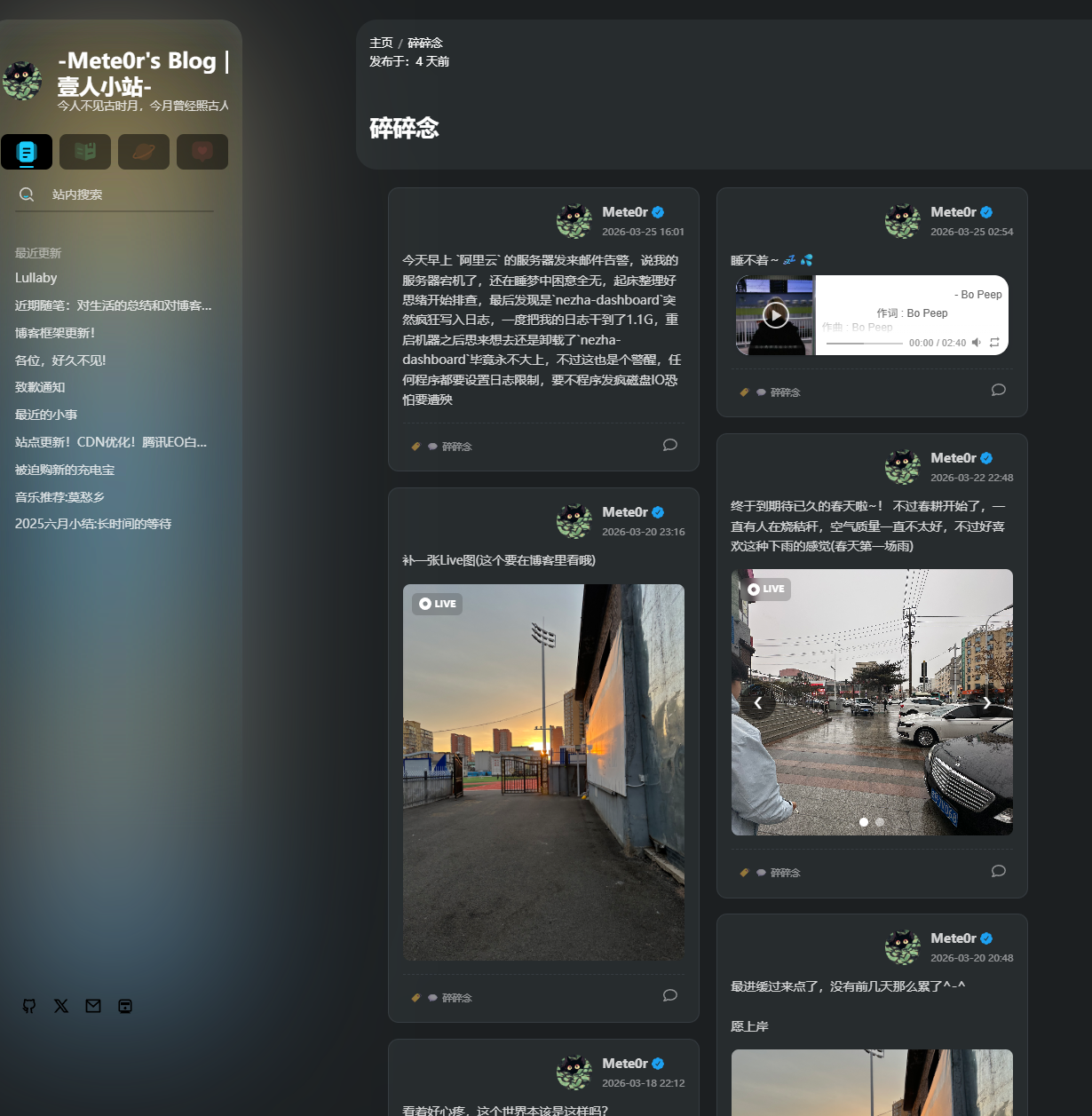
说说页面js二改文件
/* LiuShen Echo System - XSCNET Adapted Version */
/* 原作者Liushen : https://blog.liushen.fun/posts/e0b4d5a/ */
/* 引入Markdown解析库 - 新增代码开始 */
!function () {
// 动态加载marked库(CDN方式)
if (!window.marked) {
const script = document.createElement('script');
script.src = 'https://cdn.jsdmirror.com/npm/marked@12.0.2/marked.min.js';
script.async = true;
document.head.appendChild(script);
// 可选:添加代码高亮支持(如果需要解析代码块)
const highlightScript = document.createElement('script');
highlightScript.src = 'https://cdn.jsdmirror.com/npm/highlight.js@11.9.0/lib/highlight.min.js';
highlightScript.async = true;
document.head.appendChild(highlightScript);
const highlightCss = document.createElement('link');
highlightCss.rel = 'stylesheet';
highlightCss.href = 'https://cdn.jsdmirror.com/npm/highlight.js@11.9.0/styles/github.min.css';
document.head.appendChild(highlightCss);
}
}();
/* 引入Markdown解析库 - 新增代码结束 */
// 定义一个自执行的匿名函数,创建独立作用域
!function () {
// 缓存相关变量定义
const e = "EchoCacheV2", // 本地存储键名:缓存数据
t = "EchoCacheTimeV2", // 本地存储键名:缓存时间戳
// 初始化全局状态对象,用于管理定时器和事件监听器
n = window.__mete0rShuoshuoState || (window.__mete0rShuoshuoState = {
resizeHandler: null, // 窗口大小改变事件处理器
afterRenderTimer: null, // 渲染后延迟执行的定时器
listenersBound: !1 // 是否已绑定事件监听器标记
});
// --- 核心配置区 ---
const xscConfig = {
apiUrl: 'https://talk.xscnet.cn/api/echo/page', // API地址,获取说说数据的接口
avatar: 'https://img.xscnet.cn//i/2025/07/09/686e64ec429db.png', // 默认头像URL
nickname: 'Mete0r', // 默认昵称
ech0BaseUrl: 'https://talk.xscnet.cn' // ech0系统的基础URL,用于处理相对路径的图片
};
// 清理函数:清除定时器和移除窗口大小改变事件监听器
function a() {
n.afterRenderTimer && (window.clearTimeout(n.afterRenderTimer), n.afterRenderTimer = null),
n.resizeHandler && (window.removeEventListener("resize", n.resizeHandler), n.resizeHandler = null)
}
// 主要功能函数:初始化和渲染说说列表
function r() {
a(); // 清理之前的定时器和事件监听器
const r = document.querySelector("#talk"); // 获取说说容器元素
if (!r) return; // 如果找不到容器则直接返回
r.innerHTML = ""; // 清空容器内容
// 瀑布流布局函数:实现图片/卡片的瀑布流排列
const o = e => {
// 获取元素指定方向的外边距值
function t(e, t) {
const n = window.getComputedStyle(t);
return parseFloat(n[`margin${e}`]) || 0
}
// 将数值转换为带像素单位的字符串
function r(e) { return `${e}px` }
// 获取元素的左边距位置
function i(e) { return parseFloat(e.style.left) }
// 获取元素的宽度
function l(e) { return e.clientWidth }
// 计算元素底部位置(顶部位置+高度+下边距)
function s(e) {
return function (e) { return parseFloat(e.style.top) }(e) +
function (e) { return e.clientHeight }(e) +
t("Bottom", e)
}
// 计算元素右边位置(左边位置+宽度+右边距)
function c(e) { return i(e) + l(e) + t("Right", e) }
// 对元素数组按从下到上的顺序进行排序
function d(e) {
e.sort(((e, t) => s(e) === s(t) ? i(t) - i(e) : s(t) - s(e)))
}
// 如果传入的是字符串选择器,则获取对应DOM元素
if ("string" == typeof e && (e = document.querySelector(e)), !e) return;
// 设置子元素绝对定位,并收集到数组中
const u = Array.from(e.children).map((e => (e.style.position = "absolute", e)));
e.style.position = "relative"; // 设置父容器相对定位
const p = []; // 存储当前每列底部位置的元素
// 处理第一行元素:设置第一个元素的位置
u.length && (u[0].style.top = "0px", u[0].style.left = r(t("Left", u[0])), p.push(u[0]));
let m = 1; // 从第二个元素开始循环
// 将能放在第一行的元素水平排列
for (; m < u.length; m += 1) {
const n = u[m - 1], a = u[m]; // 当前元素和前一个元素
if (!(c(n) + l(a) <= l(e))) break; // 如果超出容器宽度则跳出循环
a.style.top = n.style.top, a.style.left = r(c(n) + t("Left", a)), p.push(a) // 设置元素位置
}
// 处理剩余元素:依次放置到最短列的下方
for (; m < u.length; m += 1) {
d(p); // 排序找到最短列
const e = u[m], n = p.pop(); // 取出当前最短列的底部元素
e.style.top = r(s(n) + t("Top", e)), e.style.left = r(i(n)), p.push(e) // 放置元素
}
d(p); // 最终排序
const h = p[0]; // 找到最高列的底部元素
e.style.height = h ? r(s(h) + t("Bottom", h)) : "0px"; // 设置容器高度
const f = l(e); // 记录初始容器宽度
// 设置窗口大小改变时的处理函数
n.resizeHandler = () => {
const e = document.querySelector("#talk");
e && document.body.contains(e) ? l(e) !== f && o(e) : a() // 如果容器存在且尺寸改变,则重新计算布局
},
window.addEventListener("resize", n.resizeHandler) // 添加窗口大小改变事件监听器
},
// 提取扩展信息函数:从数据对象中提取extension字段
i = e => {
const t = e?.extension;
return t && "object" == typeof t ? t : null
},
// 获取标签数组函数:从数据对象中提取标签,如果没有则默认返回"碎碎念"
l = e => Array.isArray(e?.tags) && e.tags.length ?
e.tags.map((e => e?.name || e)).filter(Boolean) :
["💬 碎碎念"],
// 格式化日期函数:将日期字符串格式化为年月日时分格式
s = e => {
const t = new Date(e); // 创建日期对象
if (isNaN(t.getTime())) return "刚刚"; // 如果日期无效则返回"刚刚"
const n = e => String(e).padStart(2, "0"); // 补零函数
// 返回格式化的日期时间字符串
return `${t.getFullYear()}-${n(t.getMonth() + 1)}-${n(t.getDate())} ${n(t.getHours())}:${n(t.getMinutes())}`
},
// 生成外部链接HTML函数:根据类型生成网站或GitHub项目链接
c = (e, t) => {
if (!t) return ""; // 如果没有数据则返回空字符串
let n = "", a = "", r = "https://img.xscnet.cn//i/2026/03/14/69b5554165047.webp";
// 处理网站链接
if ("WEBSITE" === e) {
n = t.site || t.url || "", a = t.title || n
}
// 处理GitHub项目链接
if ("GITHUBPROJ" === e) {
n = t.repoUrl || t.url || "",
a = t.title || (e => {
if (!e) return "";
// 提取GitHub仓库名称
const t = e.match(/^https?:\/\/github\.com\/[^/]+\/([^/?#]+)/i);
if (t) return t[1];
return e
})(n);
r = "https://img.xscnet.cn//i/2026/03/14/69b5554de2010.webp" // GitHub图标
}
// 返回格式化的外部链接HTML结构
return n ? `\n<div class="shuoshuo-external-link"><a class="external-link" href="${n}" target="_blank" rel="nofollow noopener"><div class="external-link-left" style="background-image:url(${r})"></div><div class="external-link-right"><div class="external-link-title">${a}</div><div>点击跳转<i class="fa-solid fa-angle-right"></i></div></div></a></div>` : ""
},
// 生成B站视频嵌入函数:根据BVID生成B站视频iframe
d = e => {
const t = e?.videoId || e?.url || ""; if (!t) return ""; // 获取视频ID或URL
let n = "";
if (/^BV[0-9A-Za-z]+$/i.test(t)) // 验证是否为有效的BVID
n = `https://www.bilibili.com/blackboard/html5mobileplayer.html?bvid=${t}&as_wide=1&high_quality=1&danmaku=0`;
// 返回视频iframe HTML
return n ? `<div style="position: relative; padding: 30% 45%; margin-top: 10px;"><iframe style="position:absolute;width:100%;height:100%;left:0;top:0;border-radius:12px;" src="${n}" frameborder="0" allowfullscreen loading="lazy"></iframe></div>` : ""
},
// 生成轮播图HTML函数:将图片数组转换为轮播图结构(已升级支持LivePhoto)
carouselHtml = (images, liveVideos = []) => {
if (!images || images.length === 0) return '';
// 内部函数:生成单个幻灯片的HTML,包含Live视频和图标
const generateSlideHtml = (img, index, isActive) => {
// 检查图片URL是否为相对路径,如果是则补全为完整URL
let imageUrl = img;
if (imageUrl && imageUrl.startsWith('/api/files/images/')) {
imageUrl = xscConfig.ech0BaseUrl + imageUrl;
}
const videoUrl = liveVideos[index];
const hasLive = !!videoUrl;
return `<div class="carousel-slide${isActive ? ' active' : ''}${hasLive ? ' has-live' : ''}">
<a href="${imageUrl}" class="carousel-image-link no-direct-link" data-fancybox="gallery" data-src="${imageUrl}">
<img src="${imageUrl}" loading="lazy" alt="图片">
${hasLive ? `
<div class="live-badge">
<svg class="live-icon" viewBox="0 0 512 512" xmlns="http://www.w3.org/2000/svg"><path d="M256 512A256 256 0 1 0 256 0a256 256 0 1 0 0 512zm0-352a96 96 0 1 1 0 192 96 96 0 1 1 0-192z" fill="currentColor"/></svg>
<span>LIVE</span>
</div>
<video class="live-video" src="${videoUrl}" loop muted playsinline preload="metadata"></video>
` : ''}
</a>
</div>`;
};
if (images.length === 1) {
// 只有一张图片时
return `<div class="image-carousel">
<div class="carousel-container single-image">
${generateSlideHtml(images[0], 0, true)}
</div>
</div>`;
} else {
// 多张图片时,显示轮播图
let slides = images.map((img, index) => generateSlideHtml(img, index, index === 0)).join('');
return `<div class="image-carousel">
<div class="carousel-container multi-images">
${slides}
<button class="carousel-btn prev-btn" type="button" aria-label="上一张">❮</button>
<button class="carousel-btn next-btn" type="button" aria-label="下一张">❯</button>
<div class="carousel-indicators">
${images.map((_, index) => `<span class="indicator${index === 0 ? ' active' : ''}" data-index="${index}"></span>`).join('')}
</div>
</div>
</div>`;
}
},
// 阻止链接默认行为直到插件加载完成
preventImageLinkDefault = () => {
// 添加事件委托,阻止图片链接的默认行为直到 fancybox 加载完成
document.addEventListener('click', function (e) {
// 检查是否点击的是图片链接且属于我们的图片链接类
const imageLink = e.target.closest('.carousel-image-link.no-direct-link');
if (imageLink) {
e.preventDefault();
e.stopPropagation();
// 检查是否已加载 fancybox
if (typeof Fancybox !== 'undefined' && typeof Fancybox.bind !== 'undefined') {
// 如果已加载,直接打开 fancybox
const galleryImages = [];
const container = imageLink.closest('.carousel-container');
// 如果是轮播图,收集所有图片;如果是单张图片,就只有一张
if (container) {
const links = container.querySelectorAll('.carousel-image-link');
links.forEach((link, index) => {
galleryImages.push({
src: link.getAttribute('href'),
thumb: link.querySelector('img').src
});
// 如果点击的就是当前这张图片,记录索引
if (link === imageLink) {
Fancybox.show(galleryImages, { startIndex: index });
}
});
} else {
// 单个图片的情况
Fancybox.show([{
src: imageLink.getAttribute('href'),
thumb: imageLink.querySelector('img').src
}]);
}
} else {
// 如果未加载,显示提示信息或等待
console.log("正在加载图片查看器...");
// 尝试多次检查 fancybox 是否加载完成
const checkFancyboxAndShow = () => {
if (typeof Fancybox !== 'undefined' && typeof Fancybox.bind !== 'undefined') {
const galleryImages = [];
const container = imageLink.closest('.carousel-container');
if (container) {
const links = container.querySelectorAll('.carousel-image-link');
links.forEach((link, index) => {
galleryImages.push({
src: link.getAttribute('href'),
thumb: link.querySelector('img').src
});
// 如果点击的就是当前这张图片,记录索引
if (link === imageLink) {
Fancybox.show(galleryImages, { startIndex: index });
}
});
} else {
// 单个图片的情况
Fancybox.show([{
src: imageLink.getAttribute('href'),
thumb: imageLink.querySelector('img').src
}]);
}
} else {
setTimeout(checkFancyboxAndShow, 100); // 100ms 后再检查
}
};
checkFancyboxAndShow();
}
}
}, true); // 使用捕获阶段确保在其他事件处理程序之前执行
},
// 格式化单条说说内容函数:处理文本、图片、视频、外部链接等
u = e => {
// 解析扩展信息
const t = (e => i(e)?.type || "")(e),
n = (e => i(e)?.payload || null)(e),
a = e?.content || ""; // 获取说说内容
// --- LivePhoto 视频提取逻辑 ---
const liveRegex = /\[live\](https?:\/\/[^\s<]+)/g;
let liveVideos = [];
let match;
while ((match = liveRegex.exec(a)) !== null) {
liveVideos.push(match[1]); // 提取带前缀的视频URL
}
// 从正文中剔除 [live] 链接,确保文字不显示干扰
const cleanText = a.replace(liveRegex, '').trim();
// --- 强制视频链接解析逻辑 ---
let videoHtml = "";
// YouTube和B站视频链接正则表达式
const youtubeRegex = /(?:https?:\/\/)?(?:www\.)?(?:youtube\.com\/watch\?v=|youtu\.be\/)([a-zA-Z0-9_-]{11})/;
const bilibiliRegex = /(?:https?:\/\/)?(?:www\.)?bilibili\.com\/video\/(BV[0-9A-Za-z]+)/;
const ytMatch = cleanText.match(youtubeRegex); // 在清洗后的文本中匹配YouTube链接
const bMatch = cleanText.match(bilibiliRegex); // 在清洗后的文本中匹配B站链接
// 如果匹配到YouTube或B站链接,则生成对应的iframe
if (ytMatch) {
videoHtml = `<div class="video-wrapper"><iframe src="https://www.youtube.com/embed/${ytMatch[1]}" frameborder="0" allowfullscreen></iframe></div>`;
} else if (bMatch) {
videoHtml = `<div class="video-wrapper"><iframe src="https://www.bilibili.com/blackboard/html5mobileplayer.html?bvid=${bMatch[1]}&as_wide=1&high_quality=1&danmaku=0" frameborder="0" allowfullscreen></iframe></div>`;
}
// 处理文本内容:替换复选框标记并将换行符转换为<br>
let o = `<div class="talk_content_text">${(e => (e || "").replace(/- \[ \]/g, "[]").replace(/- \[x\]/gi, "[x]").replace(/\n/g, "<br>"))(cleanText)}</div>`;
// 渲染视频
o += videoHtml;
// 渲染图片 - 现在使用轮播图功能
const r = (e => Array.isArray(e?.echo_files) ?
e.echo_files.map((e => e?.file || e))
.filter(e => String(e?.category || "").toLowerCase() === "image")
.map(e => {
// 检查图片URL是否为相对路径,如果是则补全为完整URL
let url = e?.url;
if (url && url.startsWith('/api/files/images/')) {
url = xscConfig.ech0BaseUrl + url;
}
return url;
}).filter(Boolean) : [])(e);
// 生成轮播图HTML (传入提取的liveVideos数组)
if (r.length > 0) {
o += carouselHtml(r, liveVideos);
}
// 检查扩展类型并添加外部链接或音乐
if (t === "WEBSITE" || t === "GITHUBPROJ") o += c(t, n);
if (t === "MUSIC") o += ((e) => {
// 解析音乐链接,识别网易云或QQ音乐
const t = ((e) => {
const t = e?.url;
if (!t) return null;
// 根据URL判断音乐平台
let n = t.includes("music.163.com") ? "netease" : t.includes("y.qq.com") ? "tencent" : "";
const a = t.match(/id=(\d+)/); // 提取音乐ID
return n && a ? { server: n, id: a[1] } : null
})(e);
// 返回MetingJS音乐播放器HTML
return t ? `<meting-js server="${t.server}" type="song" id="${t.id}" mini="false"></meting-js>` : ""
})(n);
if (t === "VIDEO") o += d(n);
// 返回格式化后的说说对象
return {
content: o,
user: xscConfig.nickname, // 用户名
avatar: xscConfig.avatar, // 头像
date: s(e?.created_at), // 格式化后的日期
tags: l(e), // 标签数组
quoteText: cleanText // 原始文本内容(引用回复使用清洗后的文字)
}
};
// 引用回复函数:在评论框中填入引用文本并滚动到评论区
p = e => {
// 查找评论框元素(支持Element UI和Artalk)
const t = document.querySelector(".el-textarea__inner") || document.querySelector(".atk-textarea");
if (t) {
t.value = `> ${e || ""}\n\n`; // 在评论框中填入引用格式
t.focus(); // 聚焦到评论框
t.dispatchEvent(new Event('input', { bubbles: true })); // 触发输入事件
// 查找评论区并平滑滚动到该区域
const tw = document.querySelector('#twikoo') || document.querySelector('#artalk');
tw && tw.scrollIntoView({ behavior: 'smooth' })
}
},
// 布局更新函数:重新计算瀑布流布局并更新懒加载和灯箱效果
m = () => {
o("#talk"), // 重新计算瀑布流布局
window.btf?.loadLightbox && btf.loadLightbox(document.querySelectorAll("#talk img:not(.no-lightbox)")), // 加载灯箱效果
window.lazyLoadInstance?.update && lazyLoadInstance.update(); // 更新懒加载实例
// 初始化轮播图功能
initCarousel();
},
// 初始化轮播图功能
initCarousel = () => {
const carousels = document.querySelectorAll('.image-carousel');
carousels.forEach(carousel => {
const container = carousel.querySelector('.carousel-container');
// --- LivePhoto 交互逻辑开始 ---
const slidesWithLive = carousel.querySelectorAll('.carousel-slide.has-live');
slidesWithLive.forEach(slide => {
const video = slide.querySelector('.live-video');
const img = slide.querySelector('img');
// 添加一个标志来跟踪视频是否已完成播放
let hasVideoPlayed = false;
// 鼠标进入:播放视频,隐藏图片
slide.addEventListener('mouseenter', () => {
// 如果视频尚未播放过,或者已经播放完成但鼠标离开了再回来,则重新播放
if (!hasVideoPlayed) {
video.currentTime = 0; // 确保每次从头播放
video.play().catch(e => console.warn("LivePhoto播放被阻挡"));
video.style.opacity = "1";
img.style.opacity = "0";
hasVideoPlayed = true;
}
});
// 鼠标离开:停止视频,恢复图片显示,并重置播放状态
slide.addEventListener('mouseleave', () => {
video.pause();
video.currentTime = 0; // 重置进度
video.style.opacity = "0";
img.style.opacity = "1";
hasVideoPlayed = false; // 重置播放状态
});
// 视频播放结束:恢复图片显示,但不重置播放状态
video.addEventListener('ended', () => {
video.style.opacity = "0";
img.style.opacity = "1";
// 不重置hasVideoPlayed,保持为true表示视频已经播放完成
});
});
// --- LivePhoto 交互逻辑结束 ---
if (container.classList.contains('single-image')) return; // 单张图片无需翻页处理
const slides = carousel.querySelectorAll('.carousel-slide');
const prevBtn = carousel.querySelector('.prev-btn');
const nextBtn = carousel.querySelector('.next-btn');
const indicators = carousel.querySelectorAll('.indicator');
let currentIndex = 0;
// 显示当前幻灯片
const showSlide = (index) => {
slides.forEach((slide, i) => {
slide.classList.toggle('active', i === index);
});
indicators.forEach((indicator, i) => {
indicator.classList.toggle('active', i === index);
});
currentIndex = index;
};
// 下一张
const nextSlide = () => {
const nextIndex = (currentIndex + 1) % slides.length;
showSlide(nextIndex);
};
// 上一张
const prevSlide = () => {
const prevIndex = (currentIndex - 1 + slides.length) % slides.length;
showSlide(prevIndex);
};
// 绑定按钮事件
if (prevBtn) prevBtn.addEventListener('click', (e) => { e.preventDefault(); e.stopPropagation(); prevSlide(); });
if (nextBtn) nextBtn.addEventListener('click', (e) => { e.preventDefault(); e.stopPropagation(); nextSlide(); });
// 绑定指示器事件
indicators.forEach((indicator, index) => {
indicator.addEventListener('click', (e) => {
e.preventDefault();
e.stopPropagation();
showSlide(index);
});
});
// 键盘支持
container.addEventListener('keydown', (e) => {
if (e.key === 'ArrowLeft') prevSlide();
if (e.key === 'ArrowRight') nextSlide();
});
});
},
// 渲染说说列表函数:将数据转换为DOM元素并添加到页面
h = e => {
// 将数据映射为DOM元素并添加到容器中
e.map(u).forEach((e => r.appendChild((e => {
// 创建说说项容器
const t = document.createElement("div"); t.className = "talk_item card-shadow";
// 创建元信息区域(头像和用户名)
const n = document.createElement("div"); n.className = "talk_meta";
// 创建头像图片元素
const a = document.createElement("img"); a.className = "no-lightbox avatar"; a.src = e.avatar;
// 创建用户信息容器
const r = document.createElement("div"); r.className = "info";
// 创建用户名标签,包含认证标识
const o = document.createElement("span"); o.className = "talk_nick";
o.innerHTML = `${e.user} <svg viewBox="0 0 512 512" xmlns="http://www.w3.org/2000/svg" class="is-badge icon" style="width:14px;margin-left:4px;vertical-align:middle;"><path d="m512 268c0 17.9-4.3 34.5-12.9 49.7s-20.1 27.1-34.6 35.4c.4 2.7.6 6.9.6 12.6 0 27.1-9.1 50.1-27.1 69.1-18.1 19.1-39.9 28.6-65.4 28.6-11.4 0-22.3-2.1-32.6-6.3-8 16.4-19.5 29.6-34.6 39.7-15 10.2-31.5 15.2-49.4 15.2-18.3 0-34.9-4.9-49.7-14.9-14.9-9.9-26.3-23.2-34.3-40-10.3 4.2-21.1 6.3-32.6 6.3-25.5 0-47.4-9.5-65.7-28.6-18.3-19-27.4-42.1-27.4-69.1 0-3 .4-7.2 1.1-12.6-14.5-8.4-26-20.2-34.6-35.4-8.5-15.2-12.8-31.8-12.8-49.7 0-19 4.8-36.5 14.3-52.3s22.3-27.5 38.3-35.1c-4.2-11.4-6.3-22.9-6.3-34.3 0-27 9.1-50.1 27.4-69.1s40.2-28.6 65.7-28.6c11.4 0 22.3 2.1 32.6 6.3 8-16.4 19.5-29.6 34.6-39.7 15-10.1 31.5-15.2 49.4-15.2s34.4 5.1 49.4 15.1c15 10.1 26.6 23.3 34.6 39.7 10.3-4.2 21.1-6.3 32.6-6.3 25.5 0 47.3 9.5 65.4 28.6s27.1 42.1 27.1 69.1c0 12.6-1.9 24-5.7 34.3 16 7.6 28.8 19.3 38.3 35.1 9.5 15.9 14.3 33.4 14.3 52.4zm-266.9 77.1 105.7-158.3c2.7-4.2 3.5-8.8 2.6-13.7-1-4.9-3.5-8.8-7.7-11.4-4.2-2.7-8.8-3.6-13.7-2.9-5 .8-9 3.2-12 7.4l-93.1 140-42.9-42.8c-3.8-3.8-8.2-5.6-13.1-5.4-5 .2-9.3 2-13.1 5.4-3.4 3.4-5.1 7.7-5.1 12.9 0 5.1 1.7 9.4 5.1 12.9l58.9 58.9 2.9 2.3c3.4 2.3 6.9 3.4 10.3 3.4 6.7-.1 11.8-2.9 15.2-8.7z" fill="#1da1f2"></path></svg>`;
// 创建日期标签
const i = document.createElement("span"); i.className = "talk_date"; i.textContent = e.date;
// 组装元信息区域
r.appendChild(o); r.appendChild(i); n.appendChild(a); n.appendChild(r);
// 创建内容区域
const l = document.createElement("div"); l.className = "talk_content"; l.innerHTML = e.content;
// 创建底部区域
const s = document.createElement("div"); s.className = "talk_bottom";
// 创建标签容器
const c = document.createElement("div"), d = document.createElement("span");
d.className = "talk_tag"; d.textContent = `🏷️ ${e.tags.join(" / ")}`;
c.appendChild(d);
// 创建评论按钮
const u = document.createElement("a");
u.className = "comment_btn";
u.href = "javascript:;";
u.addEventListener("click", (() => p(e.quoteText))); // 点击时触发引用回复
u.innerHTML = '<svg xmlns="http://www.w3.org/2000/svg" viewBox="0 0 512 512" style="width:16px;fill:currentColor;"><path d="M256 32C114.6 32 0 125.1 0 240c0 47.6 19.9 91.2 52.9 126.3C38 405.7 7 439.1 6.5 439.5c-6.6 7-8.4 17.2-4.6 26S14.4 480 24 480c61.5 0 110-25.7 139.1-46.3C192 442.8 223.2 448 256 448c141.4 0 256-93.1 256-208S397.4 32 256 32zm0 368c-26.7 0-53.1-4.1-78.4-12.1l-22.7-7.2-19.5 13.8c-14.3 10.1-33.9 21.4-57.5 29 7.3-12.1 14.4-25.7 19.9-40.2l10.6-28.1-20.6-21.8C69.7 314.1 48 282.2 48 240c0-88.2 93.3-160 208-160s208 71.8 208 160-93.3 160-208 160z"></path></svg>';
// 组装底部区域
return s.appendChild(c), s.appendChild(u), t.appendChild(n), t.appendChild(l), t.appendChild(s), t
})(e)))),
m(); // 执行布局更新
// 为视频和图片添加加载事件监听器
setTimeout(() => {
m(); // 初次渲染后再次调用瀑布流布局
// 为所有媒体元素添加加载完成事件监听
r.querySelectorAll("img, iframe, meting-js").forEach((e => {
e.addEventListener("load", m, { once: !0 });
if (e.complete && (e.tagName === 'IMG' || e.tagName === 'IFRAME')) {
m();
}
}));
// 监听 MetingJS 初始化完成事件
const initMetingObserver = () => {
const metingElements = r.querySelectorAll('meting-js');
if (metingElements.length > 0) {
const observer = new MutationObserver((mutationsList) => {
let shouldRefresh = false;
for (let mutation of mutationsList) {
if (mutation.type === 'childList') {
mutation.addedNodes.forEach(node => {
if (node.nodeType === 1 && (node.classList.contains('aplayer') || node.querySelector('.aplayer'))) {
shouldRefresh = true;
}
});
if (shouldRefresh) {
setTimeout(() => { m(); }, 100);
break;
}
}
}
});
metingElements.forEach(metingEl => {
observer.observe(metingEl, { childList: true, subtree: true });
});
setTimeout(() => { observer.disconnect(); }, 5000);
}
};
setTimeout(initMetingObserver, 100);
}, 100);
n.afterRenderTimer = window.setTimeout(m, 300)
};
// 防止图片链接默认行为
preventImageLinkDefault();
// 获取数据并渲染的立即执行函数
(() => {
const n = localStorage.getItem(e),
a = Number(localStorage.getItem(t)),
r = Date.now();
if (n && a && r - a < 18e5) {
h(JSON.parse(n))
} else {
fetch(xscConfig.apiUrl, {
method: "POST",
headers: { "Content-Type": "application/json" },
body: JSON.stringify({ page: 1, pageSize: 30 })
})
.then(e => e.json()).then(n => {
if (1 !== n?.code) return;
localStorage.setItem(e, JSON.stringify(n.data.items)),
localStorage.setItem(t, r.toString()),
h(n.data.items)
})
}
})()
}
window.initShuoshuoPage = r,
n.listenersBound || (document.addEventListener("pjax:complete", r), n.listenersBound = !0),
r()
}();说说页面js二改代码,如您有需要,可以在上方自取,再次重申,原作者:LiuShen
OpenClaw
最近很火的OpenClaw,本来我对这个东西是有一些忌惮的,毕竟大部分人都是部署在自己的电脑上,我是一个对隐私信息很在意的人,我不希望我的隐私因为一点事情而泄露
但是由于我急需一个可以在微信上对接的AI智能体,并且考虑到这个东西的开源,我决定尝试一下
我并没有把他像大多数人那样当作一个可以调用电脑的AI,反而我更希望他不能调用我电脑上的任何东西,所以我很谨慎
只是对接了AI接口和微信的接口,让他成为我的微信AI助理而已
不过这样的结果已经让我心满意足,我把它部署在了和我博客同一台服务器上,出乎意料的好用
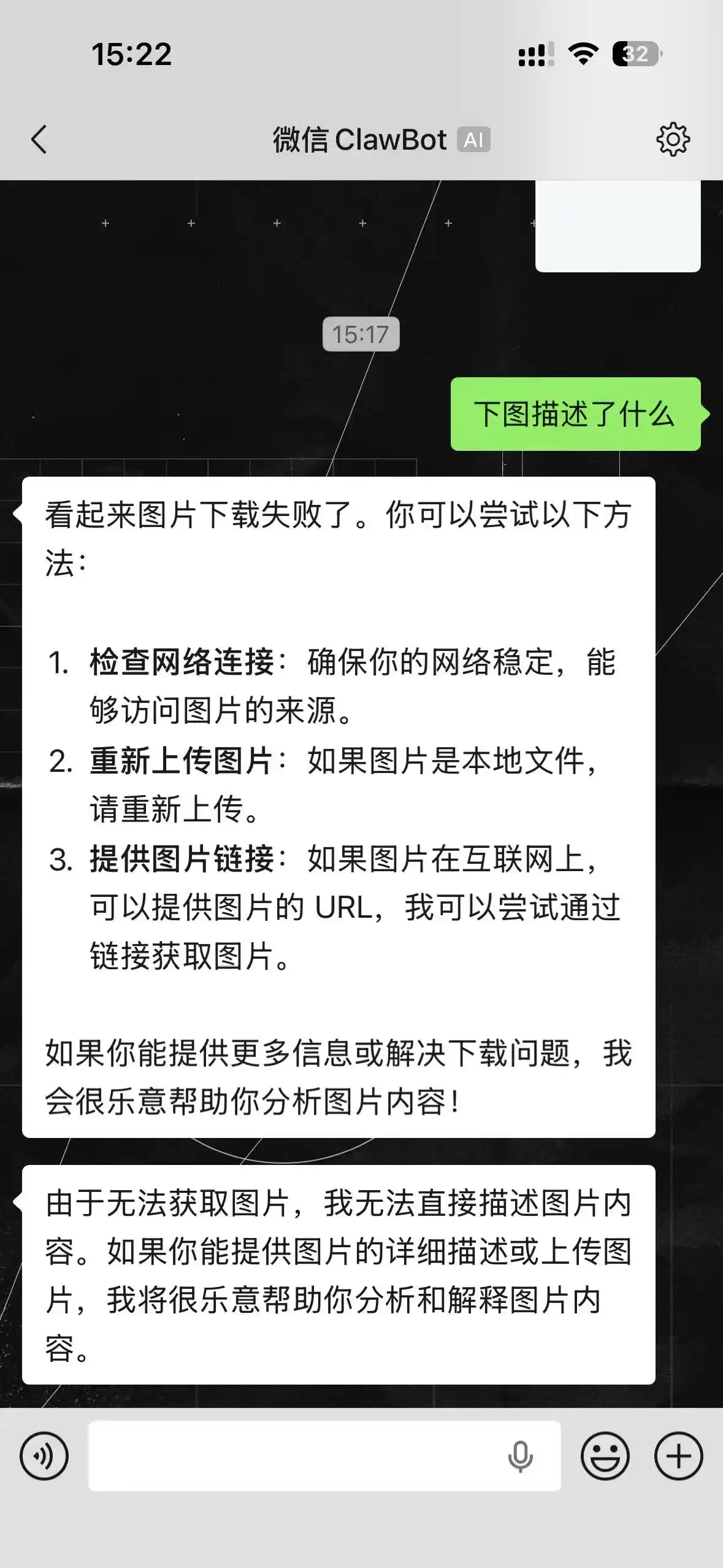
应该说是我剥夺了”ta”接触到我的世界的机会,甚至连图片和文件的权限我也没有给他开放
…
算是一次不错的体验
但肯定不能作为我的主力来使用
结语
发布了这篇文章后肯定又是很长一段时间的销声匿迹,不过会不时的在说说页面发布一些日常的琐碎小事
各位保重,身体是革命的本钱,注意自己的身心健康才是第一位的
评论区加载中...